Wednesday, June 24, 2015

Focusing on Spot Instances – Let’s Talk About Best Practices

I often point to EC2 Spot Instances as a feature that can only be implemented at world-scale with any degree of utility.

Unless you have a massive amount of compute power and a multitude of customers spread across every time zone in the world, with a wide variety of workloads, you simply won’t have the ever-changing shifts in supply and demand (and the resulting price changes) that are needed to create a genuine market. As a quick reminder, Spot Instances allow you to save up to 90% (when compared to On-Demand pricing) by placing bids for EC2 capacity. Instances will run whenever your bid exceeds the current Spot Price and can be terminated (with a two minute warning) in the presence of higher bids for the same (as determined by region, availability zone, and instance type) capacity.

Because Spot Instances come and go, you need to pay attention to your bidding strategy and to your persistence model in order to maximize the value that you derive from them. Looked at another way, by structuring your application in the right way you can be in a position to save up to 90% (or, if you have a flat budget, you can get 10x as much computing done). This is a really interesting spot for you, as the cloud architect for your organization. You can exercise your technical skills to drive the cost of compute power toward zero, while making applications that are price aware and more fault-tolerant. Master the ins and outs of Spot Instances and you (and your organization) will win!

The Trend is Clear
As I look back at the history of EC2 — from launching individual instances on demand, then on to Spot Instances, Containers, and Spot Fleets — the trend is pretty clear. Where you once had to pay attention to individual, long-running instances and to list prices, you can now think about collections of instances with an indeterminate lifetime, running at the best possible price, as determined by supply and demand within individual capacity pools (groups of instances that share the same attributes). This new way of thinking can liberate you from some older thought patterns and can open the door to some new and intriguing ways to obtain massive amounts of compute capacity quickly and cheaply, so you can build really cool applications at a price you can afford.

I should point out that there’s a win-win situation when it comes to Spot. You (and your customers) win by getting compute power at the most economical price possible at a given point in time. Amazon wins because our fleet of servers (see the AWS Global Infrastructure page for a list of locations) is kept busy doing productive work. High utilization improves our cost structure, and also has an environmental benefit.

Spot Best Practices
Over the next few months, with a lot of help from the EC2 Spot Team, I am planning to share some best practices for the use of Spot Instances. Many of these practices will be backed up with real-world examples that our customers have shared with us; these are not theoretical or academic exercises. Today I would like to kick off the series by briefly outlining some best practices.

Let’s define the concept of a capacity pool in a bit more detail. As I alluded to above, a capacity pool is a set of available EC2 instances that share the same region, availability zone, operating system (Linux/Unix or Windows), and instance type. Each EC2 capacity pool has its own availability (the number of instances that can be launched at any particular moment in time) and its own price, as determined by supply and demand. As you will see, applications that can run across more than one capacity pool are in the best position to consistently access the most economical compute power. Note that capacity in a pool is shared between On-Demand and Spot instances, so Spot prices can rise from either more demand for Spot instances or an increase in requests for On-Demand instances.

Here are some best practices to get you started.

Build Price-Aware Applications – I’ve said it before: cloud computing is a combination of a business model and a technology. You can write code (and design systems) that are price-aware, and that have the potential to make your organization’s cloud budget go a lot further. This is a new area for a lot of technologists; my advice to you is to stretch your job description (and your internal model of who you are and what your job entails) to include designing for cost savings.

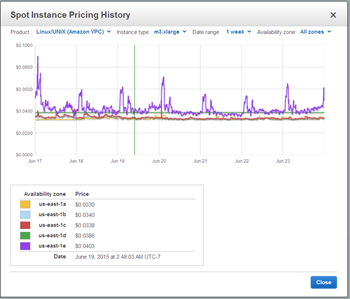
You can start by spending some time investigating (or by building some tools using the EC2 API or the AWS Command Line Interface (CLI)) the full range of capacity pools that are available to you within the region(s) that you use to run your app. High prices and a high degree of price variance over time indicate that many of your competitors are bidding for capacity in the same pool. Seek out pools that have lower prices and more stable prices (both current and historic) to find bargains and lower interruption rates.

Check the Price History – You can access historical prices on a per-pool basis going back 90 days (3 months). Instances that are currently very popular with our customers (the R3‘s as I write this) tend to have Spot prices that are somewhat more volatile. Older generations (including c1.8xlarge, m1.small, cr1.8xlarge, and cc2.8xlarge) tend to be much more stable. In general, picking older generations of instances will result in lower net prices and fewer interruptions.

Use Multiple Capacity Pools – Many types of applications can run (or can be easily adapted to run) across multiple capacity pools. By having the ability to run across multiple pools, you reduce your application’s sensitivity to price spikes that affect a pool or two (in general, there is very little correlation between prices in different capacity pools). For example, if you run in five different pools your price swings and interruptions can be cut by 80%.

A high-quality approach to this best practice can result in multiple dimensions of flexibility, and access to many capacity pools. You can run across multiple availability zones (fairly easy in conjunction with Auto Scaling and the Spot Fleet API) or you can run across different sizes of instances within the same family (Amazon EMR takes this approach). For example, your app might figure out how many vCPUs it is running on, and then launch enough worker threads to keep all of them occupied.

Adherence to this best practice also implies that you should strive to use roughly equal amounts of capacity in each pool; this will tend to minimize the impact of changes to Spot capacity and Spot prices.

To learn more, read about Spot Instances in the EC2 Documentation.

Stay Tuned
As I mentioned, this is an introductory post and we have a lot more ideas and code in store for you! If you have feedback, or if you would like to contribute your own Spot tips to this series, please send me (awseditor@amazon.com) a note.

Jeff;

Tuesday, June 23, 2015

New AWS Quick Starts – Trend Micro Deep Security and Microsoft Lync Server

We have prepared a pair of new AWS Quick Start Reference Deployments for you! As is the case with all AWS Quick Starts, they help you to deploy fully functional enterprise software the AWS cloud in no time flat!

Each of the reference deployments includes a AWS CloudFormation template that follows best AWS practices for security and availability. These templates can be used as-is, customized, or used as the basis for solutions that are even more elaborate.

Trend Micro Deep Security
Trend Micro Deep Security is a host-based security product that provides intrusion detection and prevention, anti-malware, host firewall, file and system integrity monitoring, and log inspection modules in a single agent running in the guest operating system.

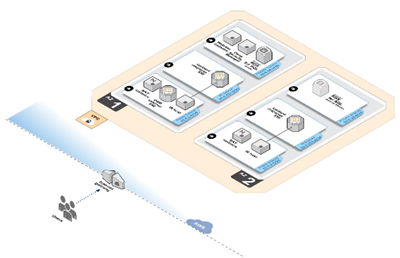
The Quick Start (Trend Micro Deep Security on the AWS Cloud) deploys Trend Micro Deep Security version 9.5 into an Amazon VPC using AMIs from the AWS Marketplace. It includes a pair of templates. The first one provides and end-to-end deployment into a new VPC; the second one works within an existing VPC.

Microsoft Lync Server

Lync Server 2013 is a communications software platform that offers instant messaging (IM), presence, conferencing, and telephony solutions for small, medium, and large businesses.

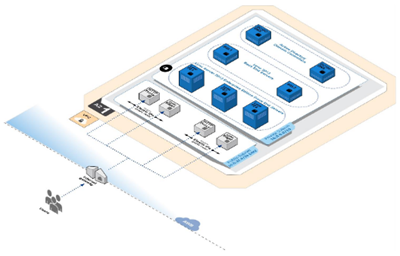
The Quick Start (Microsoft Lync Server 2013 on the AWS Cloud) implements a small or medium-sized Lync Server environment. This environment includes a pair of Lync Server 2013 Standard Edition pools across two Availability Zones for high availability.

Jeff;

Monday, June 22, 2015

New – Tag Your Amazon Glacier Vaults

Amazon Glacier is a secure, durable, and extremely low-cost storage service for data archiving and online backup (see my post, Amazon Glacier: Archival Storage for One Penny Per GB Per Month for an introduction).

Since we introduced Glacier in the summer of 2012, we have made it even more useful by adding lifecycle management, data retrieval policies & audit logging, range retrieval, and vault access policies.

Tag Your Vaults
If you are already a Glacier user (or if you have read my intro), you know that you create archives and store them in Glacier vaults.

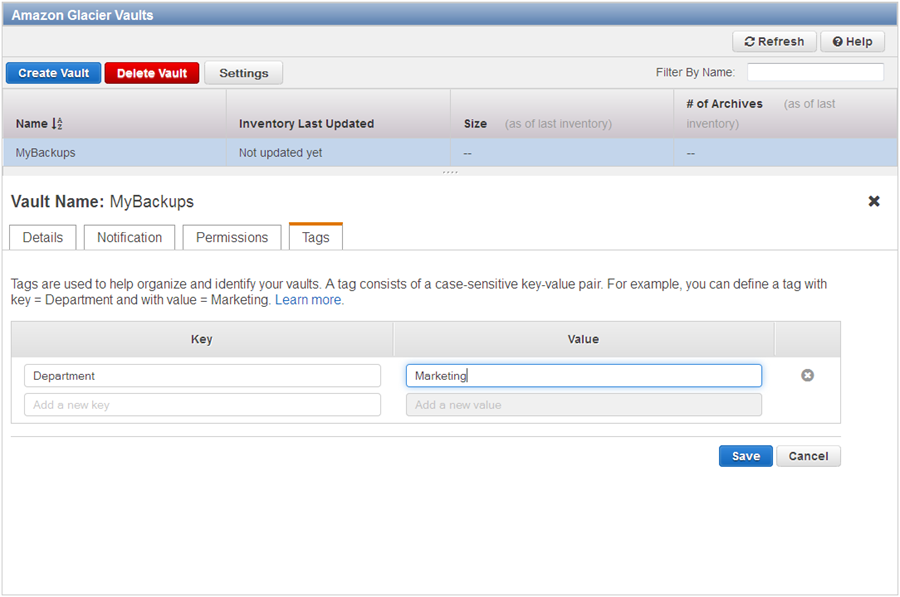
Today we are making Glacier even more useful by giving you the ability to tag your vaults. You can use these tags for cost allocation purposes (by department, group, or any other desired categorization) or for other forms of tracking.

Here’s how you tag a vault with a key named “Department”:

After you have tagged your vaults, you can use the AWS Cost Allocation Reports to view a breakdown of costs and usage by tag.

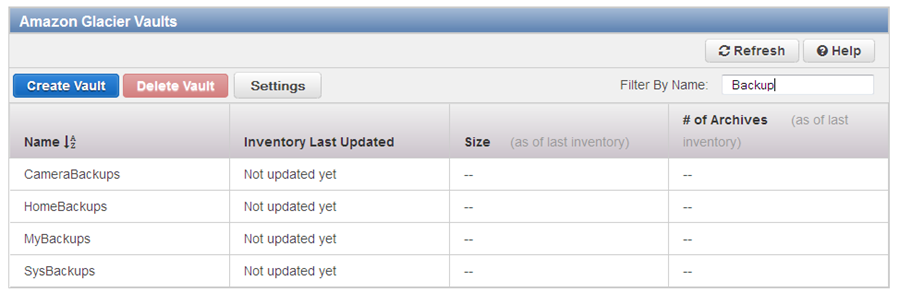
As part of today’s launch, we updated the design of the Glacier console. We also made some speed improvements and added a filtering mechanism to make it easier for you to locate a particular vault. For example, here are all of my “Backup” vaults:

This new feature is available now and you can start using it today! To learn more, read about Tagging Your Glacier Vaults.

Jeff;

Now Available – AWS SDK For Python (Boto3)

My colleague Peter Moon sent the guest post below to introduce the newest version of the AWS SDK for Python also known as Boto.

— Jeff;


Originally started as a Python client for Amazon S3 by Mitch Garnaat in 2006, Boto has been the primary tool for working with Amazon Web Services for many Python developers and system administrators across the world. Since its inception, Boto has been through an exciting journey of evolution driven by countless contributors from the Python community as well as AWS. It now supports almost 40 AWS services and is downloaded hundreds of thousands of times every week, according to PyPI. Thinking of the journey Boto has been through, I am very excited today to announce the next chapter in its history: the general availability of Boto3, the next major version of Boto.

Libraries must adapt to changes in users’ needs and also to changes in the platforms on which they run. As AWS’s growth accelerated over the years, the speed at which our APIs are updated has also gotten faster. This required us to devise a scalable method to quickly deliver support for multiple API updates every week, and this is why AWS API support in Boto3 is almost completely data-driven. Boto3 has ‘client’ classes that are driven by JSON-formatted API models that describe AWS APIs, so most new service features only require a simple model update. This allows us to deliver support for API changes very quickly, in consistent and reliable manner.

Boto comes with many convenient abstractions that hide explicit HTTP API calls and offer intuitive Python classes for working with AWS resources such as Amazon Elastic Compute Cloud (EC2) instances or Amazon Simple Storage Service (S3) buckets. We formalized this concept in Boto3 and named it Resource APIs, which are also data-driven by resource models that build on top of API models. This architecture allows us to deliver convenient object-oriented abstractions in a scalable manner not just for Boto3, but other AWS SDKs by sharing the same models across languages.

Python 3 had been one of the most frequent feature requests from Boto users until we added support for it in Boto last summer with much help from the community. While working on Boto3, we have kept Python 3 support in laser focus from the get go, and each release we publish is fully tested on Python versions 2.6.5+, 2.7, 3.3, and 3.4. So customers using any of these Python versions can have full confidence that Boto3 will work in their environment.

Lastly, while we encourage all new projects to use Boto3 instead of Boto, and existing projects to migrate to Boto3, we understand migrating existing code base to a new major version can be difficult, time-consuming, or sometimes even nearly impossible. To alleviate the pain, Boto3 has a new top-level module name (boto3), so it can be used side-by-side with your existing code that uses Boto. This makes it easy for customers to start using all new features and API support available in Boto3, even if they’re only making incremental updates to an existing project.

As always, you can find us on GitHub (https://github.com/boto/boto3). We would love to hear any questions or feedback you have in the Issues section of the repository.

To get started, install Boto3 and read the docs!

$ pip install boto3

Peter Moon, Senior Product Manager, AWS SDKs and Tools

AWS Week in Review – June 15, 2015

Let’s take a quick look at what happened in AWS-land last week:

Monday, June 15
Tuesday, June 16
Wednesday, June 17
Thursday, June 18
Friday, June 19

Upcoming Events

Upcoming Events at the AWS Loft (San Francisco)

  • June 23 – Behind the Scenes with SignalFx-Operating a SaaS product at Scale with Microservices, DevOps, and Self-Service Monitoring ( 6 PM – 7:30 PM).
  • June 26 – AWS Pop-up Loft Hack Series Sponsored by Intel (10 AM – 6 PM).

Upcoming Events at the AWS Loft (New York)

  • June 25 – Chef Bootcamp (10 AM – 6 PM).
  • June 25 – Oscar Health (6:30 PM).
  • June 26 – AWS Bootcamp (10 AM – 6 PM).
  • June 29 – Chartbeat (6:30 PM).
  • June 30 – Picking the Right Tool for the Job (HTML5 vs. Unity) (Noon – 1 PM).
  • June 30 – So You Want to Build a Mobile Game? (1 PM – 4:30 PM).
  • June 30 – Buzzfeed (6:30 PM).
  • July 6 – AWS Bootcamp (10 AM – 6 PM).
  • July 7 – Dr. Werner Vogels (Amazon CTO) + Startup Founders (6:30 PM).
  • July 7 – AWS Bootcamp (10 AM – 6 PM).
  • July 8 – Sumo Logic Panel and Networking Event (6:30 PM).
  • July 9- AWS Activate Social Event (7:00 PM – 10 PM).
  • July 10 – Getting Started with Amazon EMR (Noon – 1 PM).
  • July 10 – Amazon EMR Deep Dive (1 PM – 2 PM).
  • July 10 – How to Build ETL Workflows Using AWS Data Pipeline and EMR (2 – 3 PM).
  • July 14 – Chef Bootcamp (10 AM – 6 PM).
  • July 15 – Chef Bootcamp (10 AM – 6 PM).
  • July 16 – Science Logic (11 AM – Noon).
  • July 16 – Intel Lustre (4 PM – 5 PM).
  • July 17 – Chef Bootcamp (10 AM – 6 PM).
  • July 22 – Mashery (11 AM – 3 PM).
  • July 23 – An Evening with Chef (6:30 PM).
  • July 29 – Evident.io (6:30 PM).
  • August 5 – Startup Pitch Event and Summer Social (6:30 PM).
  • August 25 – Eliot Horowitz, CTO and Co-Founder of MongoDB (6:30 PM).
  • AWS Summits.

Help Wanted

Stay tuned for next week! In the meantime, follow me on Twitter and subscribe to the RSS feed.

Jeff;

Friday, June 19, 2015

New Preferred Payment Currency for AWS – Canadian Dollars (CAD)

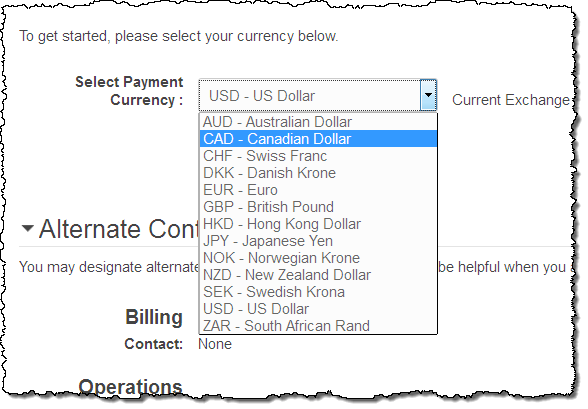
Earlier this year we gave you the option to set the preferred payment currency for your AWS account, with a choice of twelve currencies when you use an eligible Visa or Mastercard to pay your bill. Today I am pleased to announce that we are giving you the option to specify Canadian Dollars (CAD) as your desired payment currency:

The change takes effect immediately; you will be able to view and pay your AWS bill in the currency that you choose. Your preferred currency will be used in the Billing Console Dashboard, the Bills page, and in your Payment History. Pricing for AWS services and the AWS Billing Reports will continue to be shown in USD.

Jeff;

Thursday, June 18, 2015

New APN Competency – Marketing and Commerce

The AWS Partner Network (APN) allows partners to differentiate themselves and to share their expertise in particular market segments and topical areas by qualifying for one or more APN Competencies. To date we have recognized partners that have relevant experience and special expertise in the following areas:

Marketing and Commerce
Today we are introducing the new Marketing and Commerce competency. Partners with this competency focus on the following areas:

  • Content Management – Initial partners are Acquia, Adobe, CloudPeak, and Jahia.
  • Ecommerce – Initial partners are Acquia, Alert Logic, and Elastic Path.
  • Customer Analytics – Initial partners are Looker and Pitney Bowes.
  • Digital Agencies – Initial partners are ICF International, Optaros, and Razorfish.
  • Application Hosting – Initial partners are Anchor Systems Pty Ltd, Elastera, Logicworks, Tenzing Managed IT Services, UltraServe Internet Pty Ltd, ICF International, Optaros, and Razorfish.

To learn more, visit our new Marketing & Commerce Partner Solutions page.

Jeff;