Thursday, June 18, 2015

New APN Competency – Marketing and Commerce

The AWS Partner Network (APN) allows partners to differentiate themselves and to share their expertise in particular market segments and topical areas by qualifying for one or more APN Competencies. To date we have recognized partners that have relevant experience and special expertise in the following areas:

Marketing and Commerce
Today we are introducing the new Marketing and Commerce competency. Partners with this competency focus on the following areas:

  • Content Management – Initial partners are Acquia, Adobe, CloudPeak, and Jahia.
  • Ecommerce – Initial partners are Acquia, Alert Logic, and Elastic Path.
  • Customer Analytics – Initial partners are Looker and Pitney Bowes.
  • Digital Agencies – Initial partners are ICF International, Optaros, and Razorfish.
  • Application Hosting – Initial partners are Anchor Systems Pty Ltd, Elastera, Logicworks, Tenzing Managed IT Services, UltraServe Internet Pty Ltd, ICF International, Optaros, and Razorfish.

To learn more, visit our new Marketing & Commerce Partner Solutions page.

Jeff;

New T2.Large Instances

We launched the T2 instances last summer (see my post, New Low Cost EC2 Instances with Burstable Performance for more information). These instances give you a generous amount of baseline capacity and the ability to automatically and transparently scale up to full-core processing power on an as-needed basis. The bursting model is based on “CPU Credits” that accumulate during quiet periods for spending when things get busy.

Today we are adding the t2.large instance based on customer feedback and on our own usage data. Our customers told us that the burst-based model gave them plenty of CPU power to run applications that consumed large amounts of memory. The new size provides double the amount of memory, along with a higher baseline level of CPU power.

Many AWS customers are running development environments, small databases, application servers, and web servers on their T2 instances. These applications generally don’t need the full CPU very often, but they do need to burst to higher CPU performance from time to time.

Here are the specs for all of the sizes of T2 instances:

Name vCPUs Baseline Performance Platform RAM (GiB) CPU Credits / Hour Price / Hour
(Linux)
Price / Month
(Linux)
t2.micro 1 10% 32-bit or 64-bit 1 6 $0.013 $9.50
t2.small 1 20% 32-bit or 64-bit 2 12 $0.026 $19.00
t2.medium 2 40% 32-bit or 64-bit 4 24 $0.052 $38.00
t2.large 2 60% 64-bit 8 36 $0.104 $76.00

AWS customer GoSquared (“People Analytics”) has been making good use of the T2 instances. Here’s what they have to say:

“The best part about T2 instances is that, so long as you don’t spend all your CPU credits, you enjoy the performance and all the power of a much larger instance, but at a fraction of the cost. As far as the services on your instance are concerned, they’re running on a fixed performance instance.”

JT, Co-founder and Lead Front-end Engineer

GoSquared

These instances are available in the US East (Northern Virginia), US West (Oregon), US West (Northern California), Europe (Ireland), Europe (Frankfurt), Asia Pacific (Singapore), Asia Pacific (Tokyo), Asia Pacific (Sydney), South America (Brazil), and AWS GovCloud (US) regions in On-Demand and Reserved form.

Jeff;

New – Apache Spark on Amazon EMR

My colleague Jon Fritz wrote the guest post below to introduce a powerful new feature for Amazon EMR.

Jeff;


I’m happy to announce that Amazon EMR now supports Apache Spark. Amazon EMR is a web service that makes it easy for you to process and analyze vast amounts of data using applications in the Hadoop ecosystem, including Hive, Pig, HBase, Presto, Impala, and others. We’re delighted to officially add Spark to this list. Although many customers have previously been installing Spark using custom scripts, you can now launch an Amazon EMR cluster with Spark directly from the Amazon EMR Console, CLI, or API.

Apache Spark: Beyond Hadoop MapReduce
We have seen great customer successes using Hadoop MapReduce for large scale data processing, batch reporting, ad hoc analysis on unstructured data, and machine learning. Apache Spark, a newer distributed processing framework in the Hadoop ecosystem, is also proving to be an enticing engine by increasing job performance and development velocity for certain workloads.

By using a directed acyclic graph (DAG) execution engine, Spark can create a more efficient query plan for data transformations. Also, Spark uses in-memory, fault-tolerant resilient distributed datasets (RDDs), keeping intermediates, inputs, and outputs in memory instead of on disk. These two elements of functionality can result in better performance for certain workloads when compared to Hadoop MapReduce, which will force jobs into a sequential map-reduce framework and incurs an I/O cost from writing intermediates out to disk. Spark’s performance enhancements are particularly applicable for iterative workloads, which are common in machine learning and low-latency querying use cases.

Additionally, Spark natively supports Scala, Python, and Java APIs, and it includes libraries for SQL, popular machine learning algorithms, graph processing, and stream processing. With many tightly integrated development options, it can be easier to create and maintain applications for Spark than to work with the various abstractions wrapped around the Hadoop MapReduce API.

Introducing Spark on Amazon EMR
Today, we are introducing support for Apache Spark in Amazon EMR. You can quickly and easily create scalable, managed Spark clusters on a variety of Amazon Elastic Compute Cloud (EC2) instance types from the Amazon EMR console, AWS Command Line Interface (CLI) or directly using the Amazon EMR API. As an engine running in the Amazon EMR container, Spark can take advantage of Amazon EMR FS (EMRFS) to directly access data in Amazon Simple Storage Service (S3), push logs to Amazon S3, utilize EC2 Spot capacity for lower costs, and can leverage Amazon EMR’s integration with AWS security features such as IAM roles, EC2 security groups, and S3 encryption at rest (server-side and client-side). Even better, there is no additional charge to run Spark in Amazon EMR.

Spark includes Spark SQL for low-latency, interactive SQL queries, MLlib for out-of-the-box scalable, distributed machine learning algorithms, Spark Streaming for building resilient stream processing applications, and GraphX for graph processing. You can also install Ganglia on your Amazon EMR clusters for additional Spark monitoring. You can send workloads to Spark by submitting Spark steps to the EMR Step API for batch jobs, or interacting directly with the Spark API or Spark Shell on the master node of your cluster for interactive workflows.

Example Customer Use Cases
Even before today’s launch, many customers have been working with Spark on Amazon EMR, using bootstrap actions for installation. Here are a few examples:

  • The Washington Post is using Spark to power a recommendation engine to show additional content to their readers.
  • Yelp, a consumer application that connects users with local businesses, leverages the machine learning libraries included in MLlib with Spark to increase the click-through rates of display advertisements.
  • Hearst Corporation uses Spark Streaming to quickly process clickstream data from over 200 web properties. This allows them to create a real-time view of article performance and trending topics.
  • Krux uses Spark in its Data Management Platform to process log data stored in Amazon S3 using EMRFS.

Analytics With Spark – A Quick Example
To show an example of how quickly you can start processing data using Spark on Amazon EMR, let’s ask a few questions about flight delays and cancellations for domestic flights in the US.

The Department of Transportation has a public data set outlining flight information since 1987. I downloaded it, converted the file format from CSV to the columnar Parquet format (for better performance), and uploaded it to a public, read-only S3 bucket (s3://us-east-1.elasticmapreduce.samples/flightdata/input). The data set is around 4 GB compressed (79 GB uncompressed) and contains 162,212,419 rows, so it makes sense to use a distributed framework like Spark for querying. Specifically, I would like to know the 10 airports with the most departures, the most flight delays over 15 minutes, the most flight delays over 60 minutes, the and most flight cancellations. I also want to know the number of flight cancellations by yearly quarter, and the 10 most popular flight routes.

I translated these questions into SQL queries, and wrote a Spark application in Scala to run these queries. You can download the Scala code from s3://us-east-1.elasticmapreduce.samples/flightdata/sparkapp/FlightExample.scala; I have an excerpt below:

val parquetFile = hiveContext.parquetFile("s3://us-east-1.elasticmapreduce.samples/flightdata/input/")

//Parquet files can also be registered as tables and then used in SQL statements. 
parquetFile.registerTempTable("flights")

//Top 10 airports with the most departures since 2000
val topDepartures = hiveContext.sql("SELECT origin, count(*) AS total_departures FROM flights WHERE year >= '2000' GROUP BY origin ORDER BY total_departures DESC LIMIT 10")
topDepartures.rdd.saveAsTextFile(s"$OutputLocation/top_departures")

Note that the application creates a table “flights” which is an in-memory RDD, and each SQL query uses that table to reduce the I/O cost for the query. Also, Spark in EMR uses EMRFS to directly access data in S3 without needing to copy it into HDFS first. Notice the input dataset and output location in S3. I compiled the application into a JAR, and you can download it at https://s3.amazonaws.com/us-east-1.elasticmapreduce.samples/flightdata/sparkapp/flightsample_2.10-1.3.jar.

Let’s launch a three node m3.xlarge Amazon EMR cluster with Spark to execute this application. Make sure you are launching your cluster in the US East region, because the sample dataset for this example is located in that region. Go to the Create Cluster page in the Amazon EMR console. Disable Termination Protection and Logging (you can find this in the Cluster Configuration section). Scroll down to the Software Configuration section to add Spark as an Additional Applications.
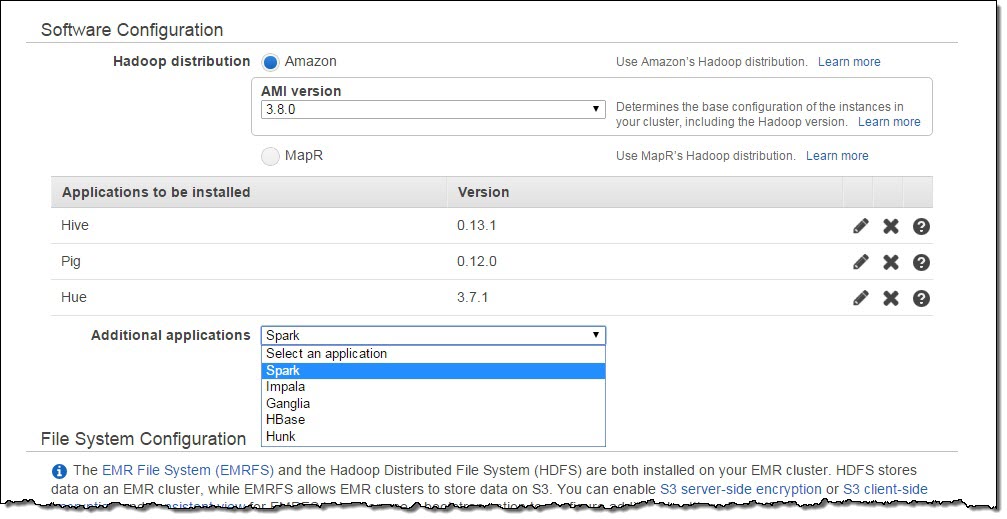
In the modal that appears after you click Configure and Add, add -x in the Arguments text box. This parameter will override the default configuration for Spark executors, which are the processes which carry out the actual execution of your application.
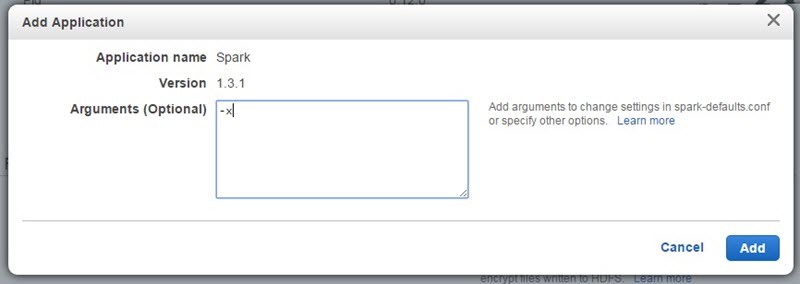
Spark’s default on AMI 3.8 is the Apache default, which is 2 executors each with 1 GB of RAM, so it makes sense to override these settings to utilize more resources on your cluster to run your Spark application. “-x” sets the number of executors to the number of core nodes at the creation of the cluster, and it sets the RAM and vcores allocated to each executor to the maximum that the selected core node type can support. The performance of your job will vary depending on your executor settings, so it’s advisable to test these settings to find the optimal configuration. Also, you can overwrite these settings at runtime by passing extra parameters to the actual spark-submit command.

Next, scroll to the Steps section near the bottom of the page to add two Steps. The first step will copy the Spark application JAR file from an S3 location to the master node of your cluster. Add a Custom Jar step, and in the modal, add s3://elasticmapreduce/libs/script-runner/script-runner.jar as the JAR location, and add /home/hadoop/bin/hdfs dfs -get s3://us-east-1.elasticmapreduce.samples/flightdata/sparkapp/flightsample_2.10-1.3.jar /mnt/ in the Arguments text box. Change the Action on failure to Terminate cluster, and click Add.
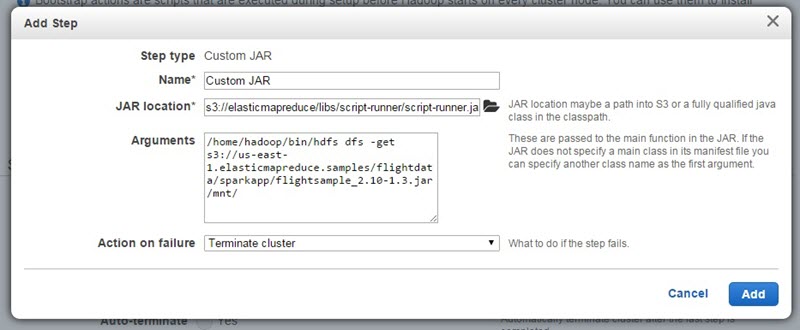
For the second step, add a Spark application step:
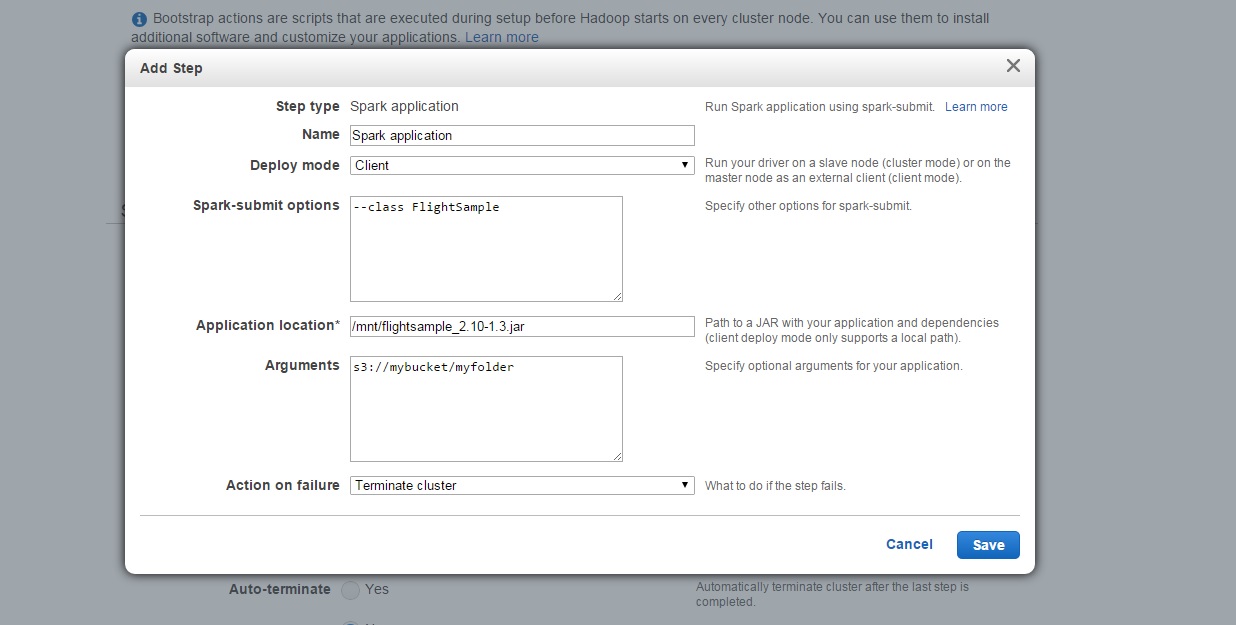
In the modal, select Client for Deploy Mode, which must submit applications from a local path (requiring the first step to copy your application from S3 to your cluster). For Application location, enter /mnt/flightsample_2.10-1.3.jar. For Arguments, add an S3 path to a bucket in your account where you would like Spark to write the output. And, change Action on failure to Terminate cluster. Then click Add.

Lastly, change Auto-terminate to Yes, so the cluster will automatically shut down once your Spark application is finished running. Then, click Create Cluster.

Amazon EMR will launch the cluster, run your Spark application, and terminate the cluster when the job is complete. You can monitor progress of your job from the Cluster Details page in the EMR console. Once the job is complete, you can view the output of the queries in the S3 bucket you indicated. I won’t ruin the surprise of the results, either – but definitely bring something to read if you’re flying from Chicago O’Hare.

Launch an Amazon EMR Cluster with Spark Today!
For more information about Spark on Amazon EMR, visit the Spark on Amazon EMR page.

Jon Fritz, Senior Product Manager

AWS Lambda Update – Run Java Code in Response to Events

Many AWS customers are using AWS Lambda to build clean, straightforward applications that handle image and document uploads, process log files from AWS CloudTrail, handle data streamed from Amazon Kinesis, and so forth. With the recently launched synchronous invocation capability, Lambda is fast becoming a favorite choice for building mobile, web and IoT backends.

Our internal mailing list is awash with discussions about interesting ways to use Lambda, many of which would fall squarely into the traditional data processing realm. These customers love Lambda because they can focus on their application and leave the hosting and scaling duties to us. To date, developers have written their Lambda functions in Node.js, a derivative of JavaScript designed specifically for use in server-side applications.

Lambda Functions in Java
Today we are making Lambda even more useful by giving you the ability to write your Lambda functions in Java. We have had many requests for this and the team is thrilled to be able to respond. This is the first in a series of additional language options that we plan to make available to Lambda developers.

Your code can make use of Java 8 features (read What’s New in JDK 8) to learn more) along with any desired Java libraries. You can also use the AWS SDK for Java to make calls to the AWS APIs.

We provide you with two libraries specific to Lambda: aws-lambda-java-core with interfaces for Lambda function handlers and the context object, and aws-lambda-java-events containing type definitions for AWS event sources (Amazon Simple Storage Service (S3), Amazon Simple Notification Service (SNS), Amazon DynamoDB, Amazon Kinesis, and Amazon Cognito). You may also want to spend some time learning more about the Lambda programming model for Java.

You can author your Lambda functions in one of two ways. First, you can use a high-level model that uses input and output objects (the input and output types can be any Java POJO or primitive):

public lambdaHandler( input, Context context) throws IOException; 
public lambdaHandler( input) throws IOException;

If you do not want to use POJOs or if Lambda’s serialization model does not meet your needs, you can use the Stream model. This is a bit lower-level:

public void lambdaHandler(InputStream input, OutputStream output, Context context) 
  throws IOException;

The class in which your Lambda function is defined should include a public zero-argument constructor, or define the handler method as static. Alternatively, you can implement one of the handler interfaces (RequestHandler::handleRequest or RequestStreamHandler::handleRequest) available within the Lambda core Java library.

Packaging, Deploying, and Uploading
You can continue to use your existing development tools. In order to prepare your compiled code for use with Lambda, you must create a ZIP or JAR file that contains your compiled code (CLASS files) and any desired JAR files (Note that deployment packages uploaded to Lambda are limited to 50 MB). Your handler functions should be stored in the usual Java directory structure (e.g. com/mypackage/MyHandler.class); the JAR files must be directly inside of a lib subdirectory. In order to make this process easy, we have published build approaches using popular Java deployment tools such as Maven and Gradle.

Specify a runtime of “java8″ when you upload your ZIP file. If you implemented one of the handler interfaces, provide the class name. Otherwise, provide the fully qualified method reference (e.g. com.mypackage.LambdaHandler::functionHandler).

Using the AWS Toolkit for Eclipse
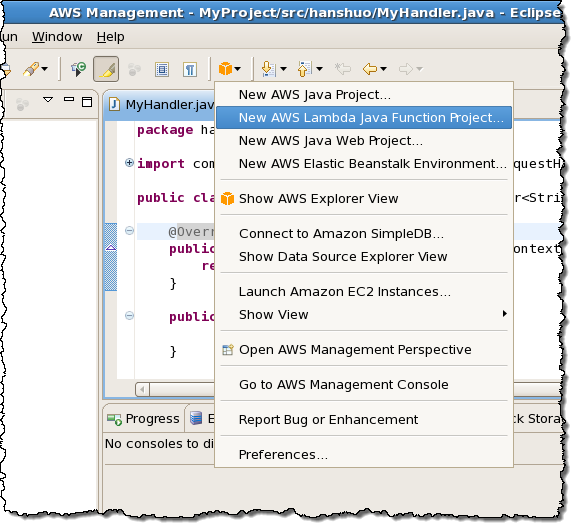
The AWS Toolkit for Eclipse plugin will automatically generate and upload the ZIP file for you. You can create a Lambda project from the AWS menu:

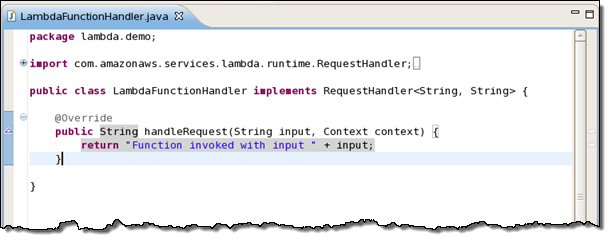
After filling in the particulars of your project you can start with template generated by the toolkit:

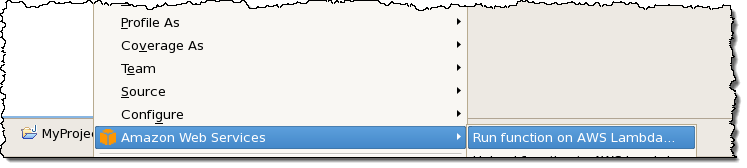
Then you can write your function and deploy it to Lambda with a click:

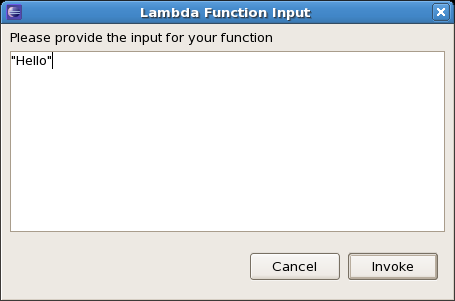
And then you can invoke it:

Available Now
You can start writing your Lambda functions in Java today!

To learn more, read about Authoring Lambda Functions in Java in the Lambda documentation.

Jeff;

AWS Week in Review – June 8, 2015

Let’s take a quick look at what happened in AWS-land last week:

Monday, June 8
Tuesday, June 9
Wednesday, June 10
Thursday, June 11
Friday, June 12

Upcoming Events

Upcoming Events at the AWS Loft (San Francisco)

  • June 15 – Amazon EC2 Container Service Deep Dive (1 – 2 PM).
  • June 16 – The Power of Logs and Machine Learning – Hosted by Splunk (11:30 AM – 4:30 PM).
  • June 16 -Fireside Chat with True Innovators, Jeremy Edberg (Reddit/Netflix) and Valentino Volonghi (Adroll) hosted by Dr. Werner Vogels CTO Amazon.com (6 – 9 PM).
  • June 17 – Hadoop Essentials with Cloudera (Noon – 4:30 PM).
  • June 18 – Behind the Scenes with Bugsnag: Responsive Infrastructure with AutoScaling (6 PM – 7:30 PM).
  • June 23 – Behind the Scenes with SignalFx-Operating a SaaS product at Scale with Microservices, DevOps, and Self-Service Monitoring ( 6 PM – 7:30 PM).
  • June 26 – AWS Pop-up Loft Hack Series Sponsored by Intel (10 AM – 6 PM).

Upcoming Events at the AWS Loft (New York)

  • June 25 – Chef Bootcamp (10 AM – 6 PM).
  • June 25 – Oscar Health (6:30 PM).
  • June 26 – AWS Bootcamp (10 AM – 6 PM).
  • June 29 – Chartbeat (6:30 PM).
  • June 30 – Picking the Right Tool for the Job (HTML5 vs. Unity) (Noon – 1 PM).
  • June 30 – So You Want to Build a Mobile Game? (1 PM – 4:30 PM).
  • June 30 – Buzzfeed (6:30 PM).
  • July 6 – AWS Bootcamp (10 AM – 6 PM).
  • July 7 – Dr. Werner Vogels (Amazon CTO) + Startup Founders (6:30 PM).
  • July 7 – AWS Bootcamp (10 AM – 6 PM).
  • July 8 – Sumo Logic Panel and Networking Event (6:30 PM).
  • July 9- AWS Activate Social Event (7:00 PM – 10 PM).
  • July 10 – Getting Started with Amazon EMR (Noon – 1 PM).
  • July 10 – Amazon EMR Deep Dive (1 PM – 2 PM).
  • July 10 – How to Build ETL Workflows Using AWS Data Pipeline and EMR (2 – 3 PM).
  • July 14 – Chef Bootcamp (10 AM – 6 PM).
  • July 15 – Chef Bootcamp (10 AM – 6 PM).
  • July 16 – Science Logic (11 AM – Noon).
  • July 16 – Intel Lustre (4 PM – 5 PM).
  • July 17 – Chef Bootcamp (10 AM – 6 PM).
  • July 22 – Mashery (11 AM – 3 PM).
  • July 23 – An Evening with Chef (6:30 PM).
  • July 29 – Evident.io (6:30 PM).
  • August 5 – Startup Pitch Event and Summer Social (6:30 PM).
  • August 25 – Eliot Horowitz, CTO and Co-Founder of MongoDB (6:30 PM).
  • AWS Summits.

Help Wanted

Stay tuned for next week! In the meantime, follow me on Twitter and subscribe to the RSS feed.

Jeff;

Wednesday, June 17, 2015

Now Available – SQL Server Enterprise Edition AMI for EC2

You can now launch SQL Server Enterprise Edition on Amazon Elastic Compute Cloud (EC2) using a new, pre-configured AMI (Amazon Machine Image).

This edition of SQL Server offers some new and unique features including:

  • High Availability – You can configure a primary database and up to four active, readable secondary databases into an Always-On availability group.
  • Self-Service Business Intelligence – You can use Power View to interactively explore and visualize your data.
  • Data Quality Services – You can use organizational and third-party reference data to profile, cleanse, and match your own data.
  • Online Changes – You can restore files and file groups, alter schemas, and make indexing changes while your database remains online.

This edition of SQL Server is also more scalable. In contrast to the Standard Edition of SQL Server which maxes out at 16 cores and 128 GiB of memory, the Enterprise Edition is able to take advantage of the 32 cores and 244 GiB of memory provided by the r3.8xlarge instance.

You can run this new AMI on r3.x2large, r3.4xlarge, and r3.8xlarge instances in the US East (Northern Virginia), US West (Oregon), and Europe (Ireland) regions (visit the AWS Marketplace for more information):

You can run the AMI On-Demand or you can purchase an EC2 Reserved Instance with a one or three year term.

— Jeff;

Monday, June 15, 2015

New – Simplified Reserved Instance Options for Amazon RDS

Reserved Instances have been a part of the AWS pricing model for quite some time. You can reserve an instance and receive a significant discount, along with a capacity reservation, when you purchase a Reserved Instance (RI).

You don’t need to make any code or administrative changes in order to benefit from Reserved Instances. We’ll automatically apply Reserved Instance rates first when we compute your bill in order to minimize your costs.

New Payment Options
We are simplifying the Reserved Instance options that are available to users of Amazon Relational Database Service (RDS). The new model is payment-based and provides a single type of Reserved Instance, with three payment options:

  • No Upfront – No upfront payment is required. This option provides a substantial discount (typically about 30%) over the one year term of the RI when compared to On-Demand.
  • Partial Upfront – With a balance of payments between upfront and hourly, this option replaces the previous Heavy Utilization RI and provides a high discount (typically about 60% for a three year term) over the course of a one or three year term.
  • All Upfront – This option allows you to pay for the entire RI term (one or three years) with one upfront payment, and provides the best discount (typically about 63% for a three year term).

Purchase Now
These options are available for all of the database engines supported by RDS (MySQL, PostgreSQL, Oracle and SQL Server) in the US East (Northern Virginia), US West (Oregon), US West (Northern California), Europe (Ireland), Europe (Frankfurt), Asia Pacific (Tokyo), Asia Pacific (Singapore), Asia Pacific (Sydney), and South America (Brazil) regions. They are not available for SQL Server License Included.

As part of this simplification, you will no longer be able to purchase the Light or Medium Utilization Reserved Instances on or after August 15, 2015.

More Info
For complete information on these new cost-saving options, please take a look at the RDS Pricing page.

Jeff;