
Tuesday, September 6, 2016
Get Up to 17% Discount on Samsung's Wearable Tech Devices
With all the different smart watches and wearable tech available in the market, it's hard to spot which ones are worth purchasing. Samsung, however, is a big name in the tech world and just like their smartphones, their wearable tech lineup for sure doesn't belong to the junk category. Two models are currently … Continue reading Get Up to 17% Discount on Samsung's Wearable Tech Devices

AWS SDK for C++ – Now Ready for Production Use
After almost a year of developer feedback and contributions, version 1.0 of the AWS SDK for C++ is now available and recommended for production use. The SDK follows semantic versioning, so starting at version 1.0, you can depend on any of the C++ SDKs at version 1.x, and upgrades will not break your build.
Based on the feedback that we received for the developer preview of the SDK, we have made several important changes and improvements:
- Semantic Versioning – The SDK now follows semantic versioning. Starting with version 1.0, you can be confident that upgrades within the 1.x series will not break your build.
- Transfer Manager – The original
TransferClienthas evolved into the new and improvedTransferManagerinterface. - Build Process – The CMake build chain has been improved in order to make it easier to override platform defaults.
- Simplified Configuration -It is now easier to set SDK-wide configuration options at runtime.
- Encryption – The SDK now includes symmetric cryptography support on all supported platforms.
- NuGet – The SDK is now available via NuGet (read AWS SDK for C++ Now Available via. NuGet to learn more).
- Fixes – The 1.0 codebase includes numerous bug fixes and build improvements.
In addition, we have more high-level APIs that we will be releasing soon to make C++ development on AWS even easier and more secure.
Here's a code sample using the new and improved TransferManager API:
#include

#include

#include


static const char* ALLOC_TAG = "main";


int main()

{

    Aws::SDKOptions options;

    Aws::InitAPI(options);


    auto s3Client = Aws::MakeShared(ALLOC_TAG);

    Aws::Transfer::TransferManagerConfiguration transferConfig;

    transferConfig.s3Client = s3Client;


    transferConfig.transferStatusUpdatedCallback =

       [](const TransferManager*, const TransferHandle& handle)

       { std::cout << "Transfer Status = " << static_cast(handle.GetStatus()) << "\n"; }


    transferConfig.uploadProgressCallback =

        [](const TransferManager*, const TransferHandle& handle)

        { std::cout << "Upload Progress: " << handle.GetBytesTransferred() << " of " << handle.GetBytesTotalSize() << " bytes\n";};


    transferConfig.downloadProgressCallback =

        [](const TransferManager*, const TransferHandle& handle)

        { std::cout << "Download Progress: " << handle.GetBytesTransferred() << " of " << handle.GetBytesTotalSize() << " bytes\n"; };


    Aws::Transfer::TransferManager transferManager(transferConfig);

    auto transferHandle = transferManager.UploadFile("/user/aws/giantFile", "aws_cpp_ga", "giantFile",

                                                     "text/plain", Aws::Map());

    transferHandle.WaitUntilFinished();


    Aws::ShutdownAPI(options);

    return 0;

}
Visit the AWS SDK for C++ home page and read the AWS Developer Blog (C++) to learn more.
Keep the Feedback Coming
Now that the AWS SDK for C++ is production-ready, we'd like to know what you think, how you are using it, and how we can make it even better. Please feel free to file issues or to submit pull requests as you find opportunities for improvement.
Jeff;


Monday, September 5, 2016
Save Up to 90% on Used Textbooks!
One of the ways to save money for back to school is to buy or rent used textbooks. You can also trade yours for an Amazon Gift Card and use this to purchase other supplies that you need for the upcoming school year. From biology to chemistry, nursing to engineering, accounting to arts, … Continue reading Save Up to 90% on Used Textbooks! 
Sunday, September 4, 2016
Amazon's Labor Day Device Sale (Limited-Time Offer Only)
Send to Kindle Reward yourself and your loved ones for all the hard work and efforts this Labor Day weekend with big savings on Amazon Tap and Fire TV Stick! Amazon Tap Starting today till the 9th of September, you get to enjoy $30 off on Echo's little sister, the Amazon Tap. Just like … Continue reading Amazon's Labor Day Device Sale (Limited-Time Offer Only) 
Friday, September 2, 2016
Amazon Aurora Update – Parallel Read Ahead, Faster Indexing, NUMA Awareness
Amazon Aurora is currently the fastest-growing AWS service!
As a relational database designed for the cloud (read Amazon Aurora – New Cost-Effective MySQL-Compatible Database Engine for Amazon RDS to learn more), Aurora offers great performance, effortless storage scaling all the way up to 64 TB, durability, and high availability. Because Aurora was designed to be compatible with MySQL, our customers have been able to move existing applications and to build new ones with ease.
With MySQL compatibility “on top” and the unique, cloud-native Aurora architecture underneath, we have a lot of room to innovate. We can continue to make Aurora more efficient while still remaining compatible with all of those applications.
Today we are making three such performance improvements to Aurora, each one aimed at making Aurora more performant on a wide range of workloads commonly run by AWS customers. Here's an overview:
Parallel Read Ahead – Range selects, full table scans, table alterations, and index generation are now up to 5x faster.
Faster Index Build – Generation of indexes is now about 75% faster.
NUMA-Aware Scheduling – When run on instances with more than one CPU chip, reads from the query cache and the buffer cache are faster, improving overall throughput by up to 10%.
Let's dive in…
Parallel Read Ahead
The InnoDB storage engine used by MySQL organizes table rows and the underlying storage (disk pages) using the index keys. This makes sequential scans over full tables fast and efficient for freshly created tables. However, as rows are updated, inserted, and deleted over time, the storage becomes fragmented, the pages are no longer physically sequential, and scans can slow down dramatically. InnoDB's Linear Read Ahead feature attempts to deal with this fragmentation by bringing up to 64 pages in to memory before they are actually needed. While well-intentioned, this feature does not provide a meaningful performance improvement on enterprise-scale workloads.
With today's update, Aurora is now a lot smarter about handling this very common situation. When Aurora scans a table, it logically (as opposed to physically) identifies and then performs a parallel prefetch of the additional pages. The parallel prefetch takes advantage of Aurora's replicated storage architecture (two copies in each of three Availability Zones) and helps to ensure that the pages in the database cache are relevant to the scan operation.
As a result of this change, range selects, full table scans, the ALTER TABLE operation, and index generation are up to 5x faster than before.
You will see the improved performance as soon as you upgrade to Aurora 1.7 (see below for more information).
Faster Index Build
When you create a primary or secondary index on a table, the storage engine creates a tree structure that contains the new keys. This process entails a lot of top-down tree searching and plenty of page-splitting as the tree is restructured to accommodate more and more keys.
Aurora now builds the trees in a bottom-up fashion, building the leaves first and then adding parent pages as needed. This reduces the amount of back-and-forth to storage, and also obviates the need to split pages since each page is filled once.
With this change, adding indexes and rebuilding tables is now up to 4x faster than before, depending on the table schema. For example, the Aurora team created a table with the following schema, and added 100 million rows, resulting in a 5 GB table:
create table test01 (id int not null auto_increment primary key, i int, j int, k int);
Then they added four additional indexes:
alter table test01 add index (i), add index (j), add index (k), add index comp_idx(i, j, k);
On a db.r3.large instance, the time to run this query dropped from 67 minutes to 25 minutes. On a db.r3.8xlarge instance, the time dropped from 29 minutes to 11.5 minutes.
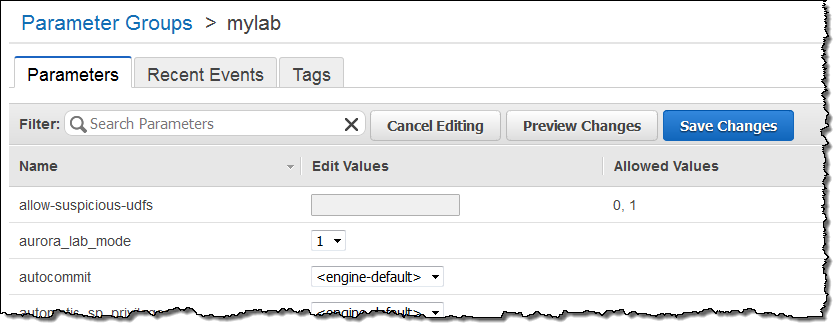
This is a brand new feature and we would like you to try it out on your non-production workloads. You'll need to upgrade to Aurora 1.7 and then set aurora_lab_mode to 1 in the DB Instance Parameter group (see DB Cluster and DB Instance Parameters to learn more):
The team is very interested in your feedback on this performance enhancement. Please feel free to post your observations in the Amazon RDS Forum.
NUMA-Aware Scheduling
The largest DB Instance (db.r3.8xlarge) has two CPU chips and a feature commonly known as NUMA, short for Non-Uniform Memory Access. On systems of this type, each an equal fraction of main memory is directly and efficiently accessible to each CPU. The remaining memory is accessible via a somewhat less efficient cross-CPU access path.
Aurora now does a better job of scheduling threads across the CPUs in order to take advantage of this disparity in access times. The threads no longer need to fight against each other for access to the less-efficient memory attached to the other CPUs. As a result, CPU-bound operations that make heavy use of the query cache and the buffer cache now run up to 10% faster. The performance improvement will be most apparent when you are making hundreds or thousands of connections to the same database instance. As an example, performance on the Sysbench oltp.lua benchmark grew from 570,000 reads/second to 625,000 reads/second. The test was run on a db.r3.8xlarge DB Instance with the following parameters:
oltp_table_count=25oltp_table_size=10000num-threads=1500
You will see the improved performance as soon as you upgrade to Aurora 1.7.
Upgrading to Aurora 1.7
Newly created DB Instances will run Aurora 1.7 automatically. For exiting DB Instances, you can choose to install the update immediately or during your next maintenance window.
You can confirm that you are running Aurora 1.7 by running the following query:
mysql> show global variables like "aurora_version";

+----------------+-------+

| Variable_name  | Value |

+----------------+-------+

| aurora_version | 1.7   |

+----------------+-------+
Jeff;

Thursday, September 1, 2016
Get Big Discounts from Amazon's “Apple Store”
Buying your next Apple gadget is quick and hassle-free since their retail stores are pretty much everywhere. But when it comes to the price tag, it's not that pocket-friendly. Yes, Apple products are quite expensive and most of them have high margins. If you want to save more, check out Amazon instead. The … Continue reading Get Big Discounts from Amazon's “Apple Store” 
New – Auto Scaling for EC2 Spot Fleets
The EC2 Spot Fleet model (see Amazon EC2 Spot Fleet API – Manage Thousands of Spot Instances with one Request for more information) allows you to create a fleet of EC2 instances with a single request. You simply specify the fleet's target capacity, enter a bid price per hour, and choose the instance types that you would like to have as part of your fleet.
Behind the scenes, AWS will maintain the desired target capacity (expressed in terms of instances or a vCPU count) by launching Spot instances that result in the best prices for you. Over time, as instances in the fleet are terminated due to rising prices, replacement instances will be launched using the specifications that result in the lowest price at that point in time.
New Auto Scaling
Today we are enhancing the Spot Fleet model with the addition of Auto Scaling. You can now arrange to scale your fleet up and down based on a Amazon CloudWatch metric. The metric can originate from an AWS service such as EC2, Amazon EC2 Container Service, or Amazon Simple Queue Service (SQS). Alternatively, your application can publish a custom metric and you can use it to drive the automated scaling. Either way, using these metrics to control the size of your fleet gives you very fine-grained control over application availability, performance, and cost even as conditions and loads change. Here are some ideas to get you started:
- Containers – Scale container-based applications running on Amazon ECS using CPU or memory usage metrics.
- Batch Jobs – Scale queue-driven batch jobs based on the number of messages in an SQS queue.
- Spot Fleets – Scale a fleet based on Spot Fleet metrics such as
MaxPercentCapacityAllocation. - Web Service – Scale web services based on measured response time and average requests per second.
You can set up Auto Scaling using the Spot Fleet Console, the AWS Command Line Interface (CLI), AWS CloudFormation, or by making API calls using one of the AWS SDKs.
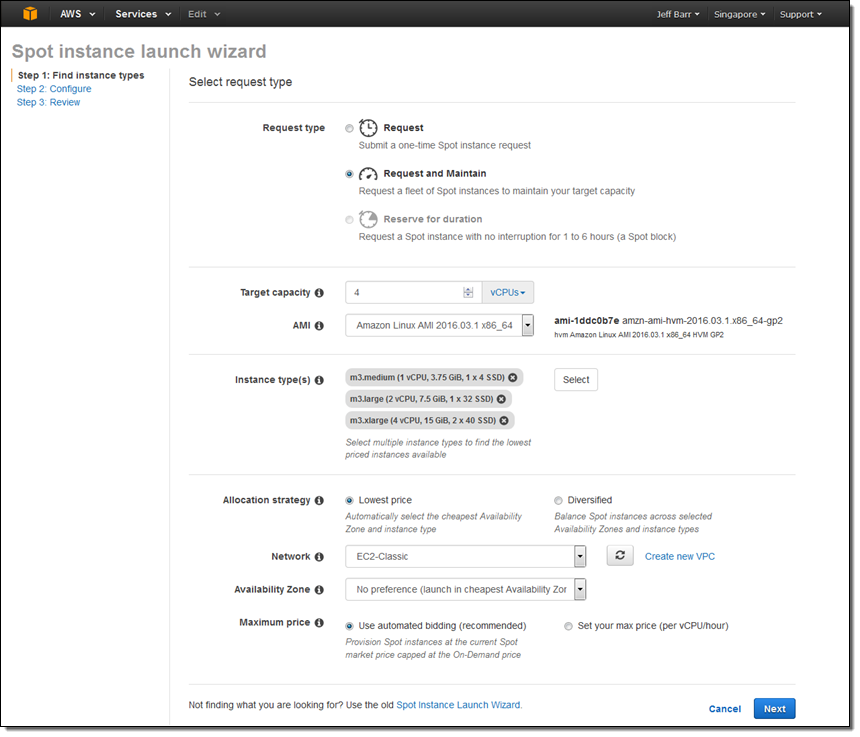
I started by launching a fleet. I used the request type Request and maintain in order to be able to scale the fleet up and down:
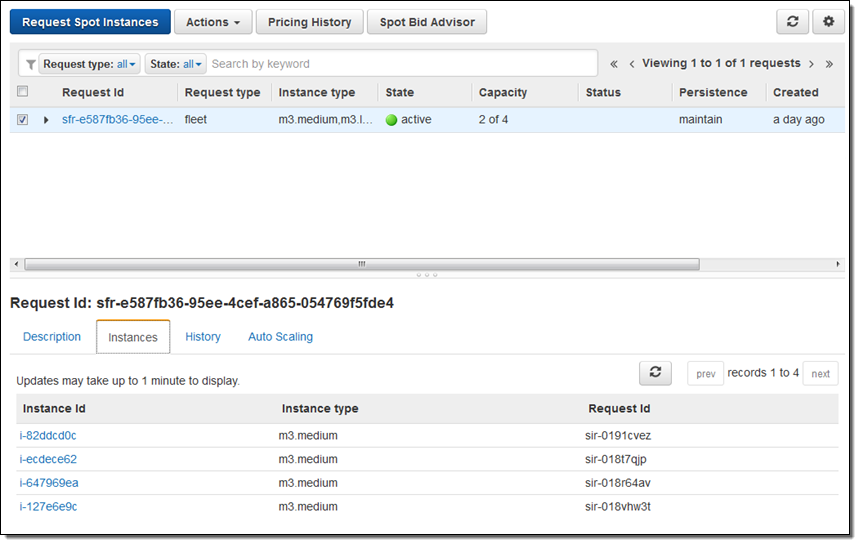
My fleet was up and running within a minute or so:
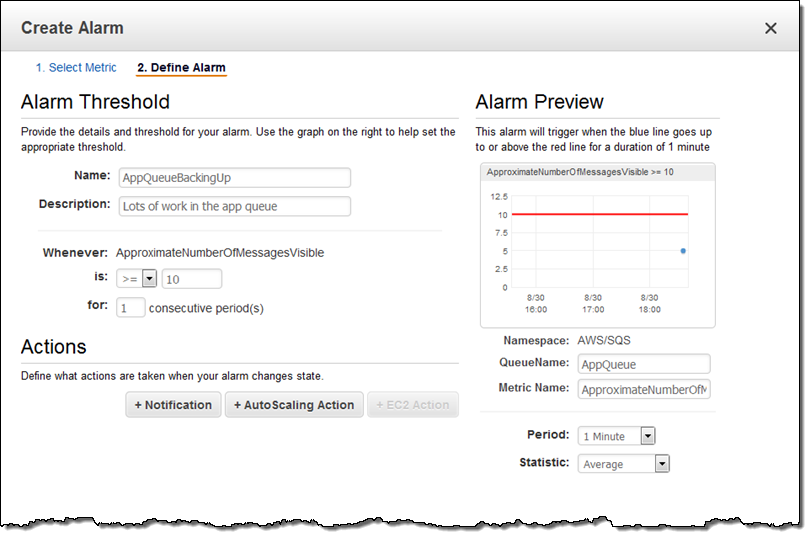
Then (for illustrative purposes) I created an SQS queue, put some messages in it, and defined a CloudWatch alarm (AppQueueBackingUp) that would fire if there were 10 or more messages visible in the queue:
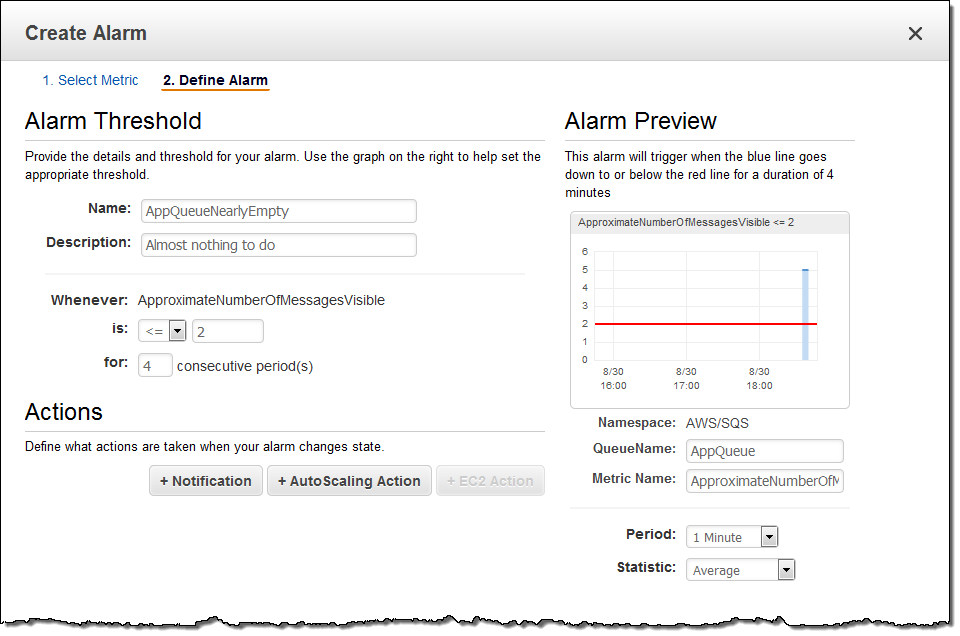
I also defined an alarm (AppQueueNearlyEmpty) that would fire if the queue was just about empty (2 messages or less).
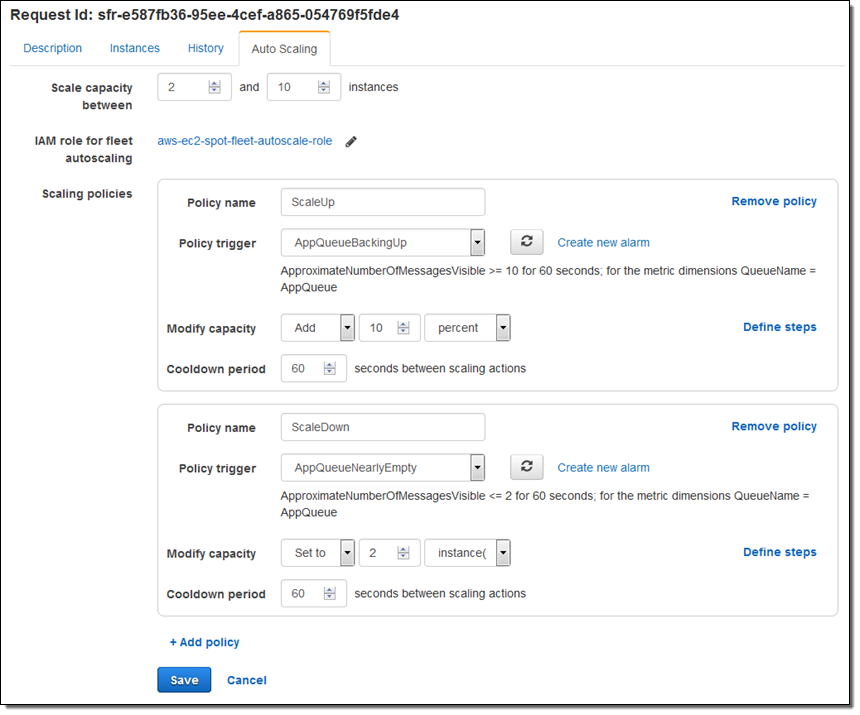
Finally, I attached the alarms to the ScaleUp and ScaleDown policies for my fleet:
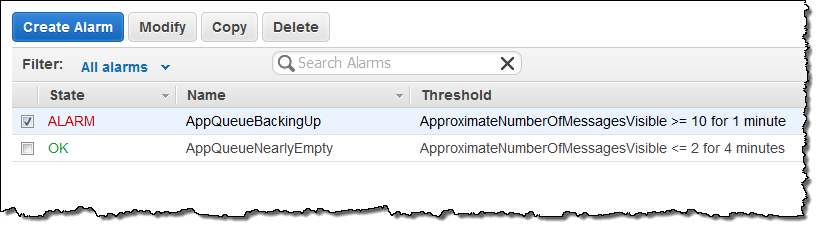
Before I started writing this post, I put 5 messages into the SQS queue. With the fleet launched and the scaling policies in place, I added 5 more, and then waited for the alarm to fire:
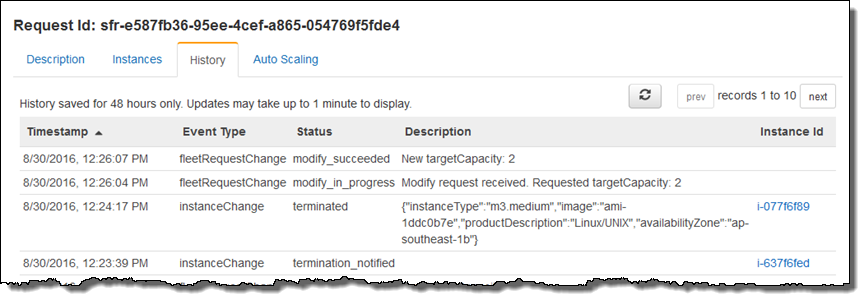
Then I checked in on my fleet, and saw that the capacity had been increased as expected. This was visible in the History tab (“New targetCapacity: 5”):
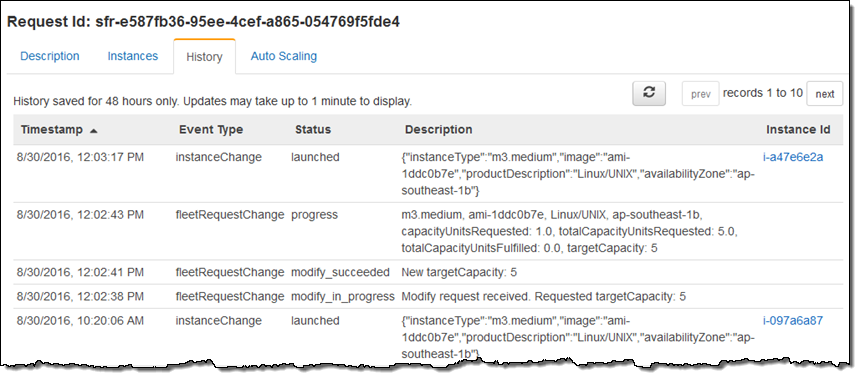
To wrap things up I purged all of the messages from my queue, watered my plants, and returned to find that my fleet had been scaled down as expected (“New targetCapacity: 2”):
Available Now
This new feature is available now and you can start using it today in all regions where Spot instances are supported.
Jeff;

Subscribe to:
Posts (Atom)